Micro:Bit Maqueen: Line Following
This activity is designed as part of a workshop offered by our outreach team. We recommend you finish the Remote Control Challenge first.
Getting Started
For this challenge you will be working in pairs with a BBC Micro:Bit. As there are a limited number of the Maqueen robots, please try to be considerate during testing.
Open a New Project on Makecode called 'line following'.
You will then need to go to 'Extensions' in the block menu, then search for 'maqueen' and click on the "DFRobot_MaqueenPlus_v20" option.
Now, you have all the blocks necessary for this activity.
The Challenge
Can you program a Maqueen robot to successfully follow a line?
This activity will take you through each step of making your own program.
How can the Maqueen 'see' the line?
The robot you'll be using has 5 line-following sensors underneath - as shown in the below image.
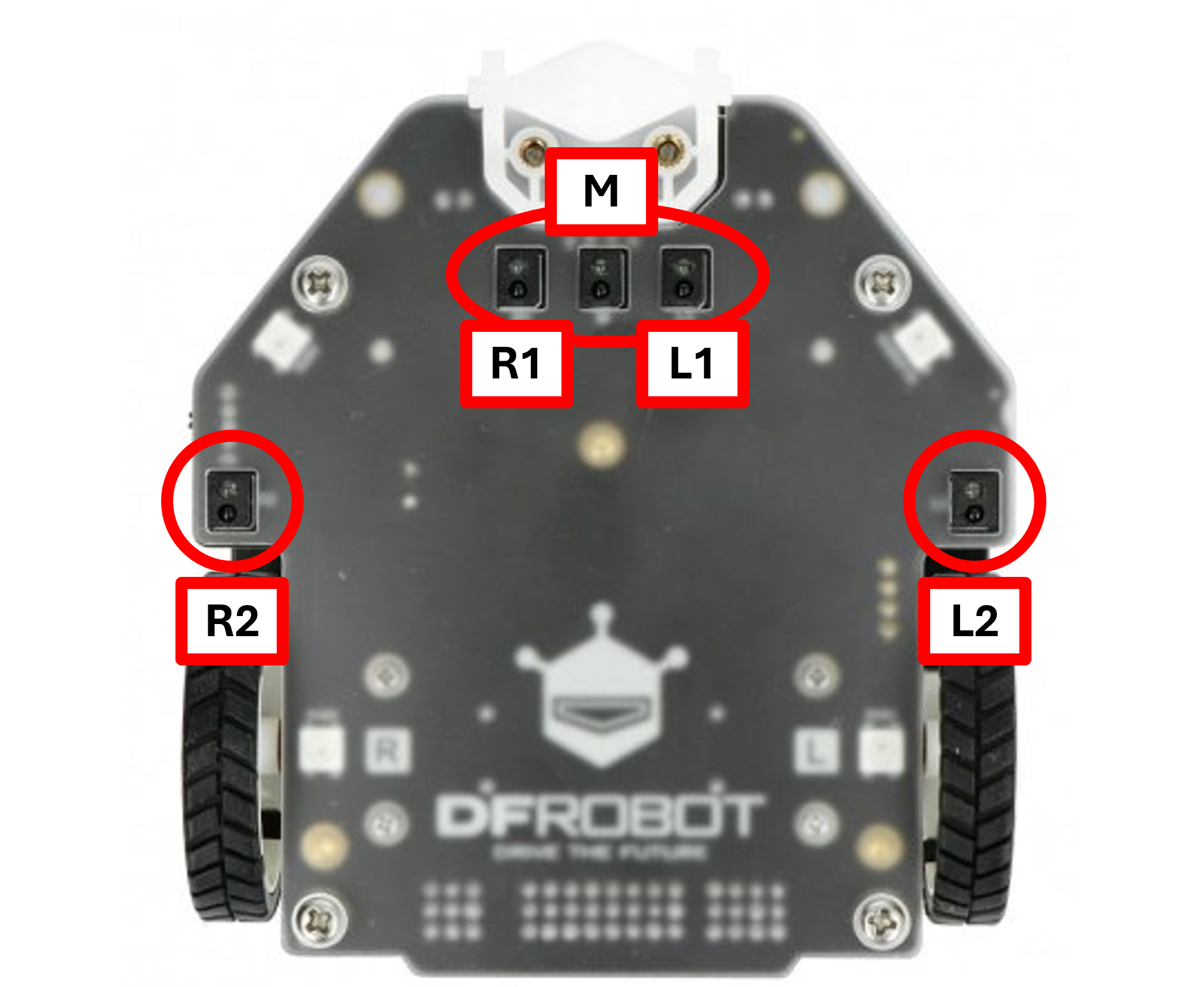
We'll only be using the sensors labelled 'R1', 'M', and 'L1' for this challenge as we want the robot to try and stay central on the line.
These sensors are digital - this means they have two options: 0 (does not see black) and 1 (sees black).
Programming blocks
For this activity you will need:
- An if, else if (several), and else statement inside the forever block.
- You may wish to use the 'and' logic block that allows an if / else if statement two rules. This is the approach used in our examples.
- Another option is to have if statements inside the main if statement.
- The line sensor and motor blocks (with speed control) for the Maqueen.
- A catch-all safety that stops the robot written inside the else statement.
Here is an example of a possible starting point for your if statement.
This looks quite complicated, so let's break it down:
- This if statement is asking for 2 things to be true at the same time - that the L1 sensor does not see the line whilst the M sensor does.
- This means the robot is starting to move left off the line.
- The blocks inside this statement are telling the robot motors to start turning right to correct.
- You will need to decide on the speed for your motors (between 0 and 255).
Remember: Higher speeds = lower accuracy.
You will then need to add an else if statement for when the robot starts leaving the line towards the right. This will then correct by moving left.
More else if statements may be needed for any other sensor reading possibilities - depending on the width of the line.
The else statement created will need to use motor stop blocks for both the left and right motors.
We've added red boxes inside each empty statement with the directions you need to program the motors for.
Remember: The program works down the blocks in order. With a multiple else-if statement, it will stop the first time the conditions are met.
Testing
SAFETY: Please keep long hair tied back to reduce the risk of it getting trapped in any wheels.
There are several different black lines provided to test your program on.
The best program is the one that works on all of them, without having to change the program.
Please start with the level one line and do not move up a level until your robot has completed it.
To test your program, you will need to plug your Micro:Bit into the computer and download the program onto it.
Place the Maqueen robot on your chosen track, insert the Micro:Bit, turn it on and watch. Be ready to carefully pick it up if it risks going too far / crashing - if the wheels are still turning, switch off the robot.
SAFETY: Do not touch or stop the wheels from turning as this may cause injury and will damage the motors.
Extensions
Congratulations on completing the challenge!
There are still a couple of things we could add to this program:
- Use button A and button B on the Micro:Bit to decide whether to use a fast program or a slow one. The lower level lines can be completed at higher speeds than the harder ones.
- See if you can figure out how to use the ultrasonic sensor on front of the robot to make it pause its program when it detects something in front of it.
You could also help other people in the class if they want you to.
- We also have other Micro:Bit challenges available in our Online Micro:Bit Workshop Series. These include virtual pets (Session 2), traffic lights (Session 4), sound meters (Session 5), railway crossings (Session 6) and a Magic 8 Ball (Extra).
The only ultrasonic block available in the Maqueen Plus menu is a value block (rounded ends).
This means you will need to create a new variable (called 'distance') to store the reading in and then use it at the start of your line following if statement.
Here is an example of setting variable:
This needs to be at the very start of your forever loop to keep it updated.
You can then use it in an if statement:
The # will need to be replaced by how far away an object is in cm to start being detected.
We hope you've enjoyed this workshop!